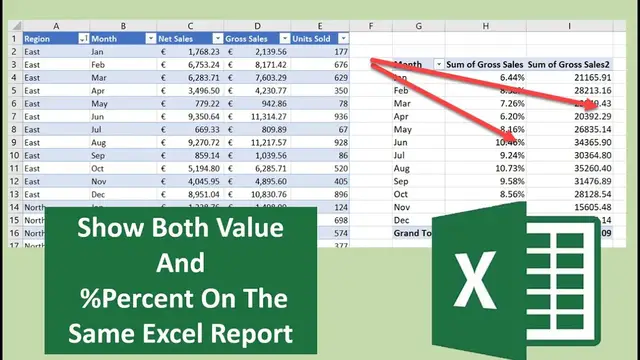

Excel Tip. Show Value And Percent In Same Report- No Formulas!
Oct 4, 2021

👍𝐌𝐲 𝐑𝐞𝐜𝐨𝐦𝐦𝐞𝐧𝐝𝐞𝐝 𝐏𝐢𝐯𝐨𝐭 𝐓𝐚𝐛𝐥𝐞 𝐂𝐨𝐮𝐫𝐬𝐞:
𝐡𝐭𝐭𝐩://𝐰𝐰𝐰.𝐦𝐨𝐭𝐡𝐫𝐞𝐬𝐨𝐮𝐫𝐜𝐞.𝐜𝐨𝐦/𝟏𝟓𝟐-𝟐𝟕-𝟏-𝟒𝟏.𝐡𝐭𝐦𝐥
𝐉𝐨𝐢𝐧 𝐦𝐞 𝐄𝐕𝐄𝐑𝐘 𝐅𝐑𝐈𝐃𝐀𝐘 𝐟𝐨𝐫 #𝐟𝐨𝐫𝐦𝐮𝐥𝐚𝐟𝐫𝐢𝐝𝐚𝐲 𝐚𝐧𝐝 𝐄𝐕𝐄𝐑𝐘 𝐌𝐎𝐍𝐃𝐀𝐘 𝐟𝐨𝐫 #𝐦𝐚𝐜𝐫𝐨𝐦𝐨𝐧𝐝𝐚𝐲𝐬 𝐨𝐧 𝐭𝐡𝐞 𝐡𝐭𝐭𝐩://𝐰𝐰𝐰.𝐡𝐨𝐰𝐭𝐨𝐞𝐱𝐜𝐞𝐥𝐚𝐭𝐞𝐱𝐜𝐞𝐥.𝐜𝐨𝐦 𝐛𝐥𝐨𝐠 𝐟𝐨𝐫 𝐥𝐨𝐭𝐬 𝐨𝐟 #𝐞𝐱𝐜𝐞𝐥𝐭𝐢𝐩𝐬
𝐉𝐨𝐢𝐧 𝐭𝐡𝐨𝐮𝐬𝐚𝐧𝐝𝐬 𝐨𝐟 𝐨𝐭𝐡𝐞𝐫 𝐄𝐱𝐜𝐞𝐥 𝐮𝐬𝐞𝐫𝐬 𝐰𝐡𝐨 𝐡𝐚𝐯𝐞 𝐚𝐥𝐫𝐞𝐚𝐝𝐲 𝐣𝐨𝐢𝐧𝐞𝐝 𝐭𝐡𝐞 𝐄𝐱𝐜𝐞𝐥 𝐀𝐭 𝐄𝐱𝐜𝐞𝐥 𝐌𝐨𝐧𝐭𝐡𝐥𝐲 𝐍𝐞𝐰𝐬𝐥𝐞𝐭𝐭𝐞𝐫. 𝟑 𝐅𝐑𝐄𝐄 𝐄𝐱𝐜𝐞𝐥 𝐓𝐢𝐩𝐬 𝐞𝐯𝐞𝐫𝐲 𝐦𝐨𝐧𝐭𝐡. 𝐏𝐥𝐮𝐬 𝐅𝐑𝐄𝐄 𝟑𝟎 𝐓𝐢𝐩𝐬 𝐄𝐁𝐨𝐨𝐤.
𝐡𝐭𝐭𝐩://𝐰𝐰𝐰.𝐡𝐨𝐰𝐭𝐨𝐞𝐱𝐜𝐞𝐥𝐚𝐭𝐞𝐱𝐜𝐞𝐥.𝐜𝐨𝐦/𝐧𝐞𝐰𝐬𝐥𝐞𝐭𝐭𝐞𝐫-𝐬𝐢𝐠𝐧-𝐮𝐩/
𝐁𝐞 𝐒𝐨𝐜𝐢𝐚𝐥 & 𝐋𝐞𝐭❜𝐬 𝐂𝐨𝐧𝐧𝐞𝐜𝐭
👍𝐖𝐞𝐛𝐬𝐢𝐭𝐞 𝐡𝐭𝐭𝐩://𝐰𝐰𝐰.𝐡𝐨𝐰𝐭𝐨𝐞𝐱𝐜𝐞𝐥𝐚𝐭𝐞𝐱𝐜𝐞𝐥.𝐜𝐨𝐦
👍𝐓𝐰𝐢𝐭𝐭𝐞𝐫 𝐡𝐭𝐭𝐩𝐬://𝐭𝐰𝐢𝐭𝐭𝐞𝐫.𝐜𝐨𝐦/𝐡𝐨𝐰𝐭𝐨𝐞𝐱𝐜𝐞𝐥𝐚𝐭𝐞𝐱
Often you will need to display a value as well as per cent in the same report. Today I will show you how to avoid using formulas to do this!
We go back to one of the best tools in our Excel took kit, the Pivot Table. So, the first step is to build the Table.
👉𝐃𝐨𝐰𝐧𝐥𝐨𝐚𝐝 𝐭𝐡𝐞 𝐖𝐨𝐫𝐤𝐛𝐨𝐨𝐤 𝐡𝐞𝐫𝐞.
https://howtoexcelatexcel.com/download/show-value-and-percent-on-same-report/
👉𝐑𝐞𝐚𝐝 𝐓𝐡𝐞 𝐁𝐥𝐨𝐠 𝐏𝐨𝐬𝐭 𝐇𝐞𝐫𝐞.
https://howtoexcelatexcel.com/formulas/show-value-and-percent-in-same-report-no-formulas/
𝐀𝐝𝐝 𝐆𝐫𝐨𝐬𝐬 𝐒𝐚𝐥𝐞𝐬 𝐅𝐢𝐞𝐥𝐝 𝐓𝐨 𝐓𝐡𝐞 𝐏𝐢𝐯𝐨𝐭 𝐓𝐚𝐛𝐥𝐞.
Next, drag the GROSS Sales field to the Values area of the Pivot Table which does the hard work for us. Then add the Month field to the Rows area to easily calculate the Gross Sales per month.
The requests for this data or report is to show not only the ACTUAL GROSS sales per month but the % SPLIT PER MONTH of TOTAL GROSS SALES. This is really easy with our Pivot Table solution.
There are TWO ways to show the monthly percentage split.
𝐌𝐞𝐭𝐡𝐨𝐝 𝟏.
*Right, Click on the data area where your gross sales are shown.
*Select Value Field Settings.
*Click the Show Value As Tab.
*Select % of Column Total.
This will change the monthly gross values to a percentage of the full years of gross sales. Showing just these sales as a percentage split. This is great information.
𝐌𝐄𝐓𝐇𝐎𝐃 𝟐. 𝐀𝐝𝐝𝐢𝐧𝐠 𝐕𝐚𝐥𝐮𝐞 𝐀𝐧𝐝 𝐏𝐞𝐫𝐜𝐞𝐧𝐭.
If you want to display the ACTUAL GROSS sales AND the % split, then this second method is the one to use.
*Drag the GROSS Sales field to the value are of the Pivot Table (AGAIN).
*You now have both the % split and the actual sales value.
*YES! Easy as that!.
Show More Show Less