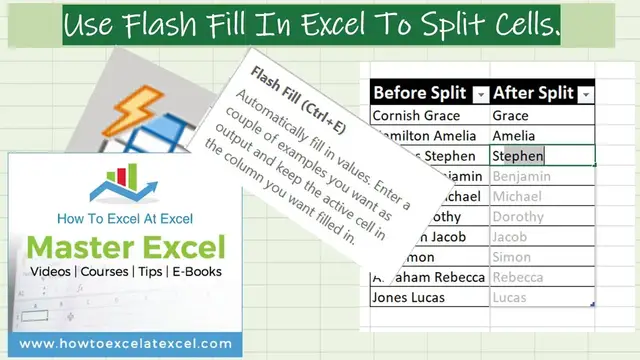

How to Split Text EXCEL Cells with Flash Fill
Nov 20, 2021

In this #ExcelTips video, I will show you how to use flash fill to split your cells into separate columns. Yes, that is correct. It is an alternative to Text To Columns that you may currently use.
Instead, we can use the Flash Fill option in Excel to do this. Flash fill in Excel is an intuitive function in Excel. Essentially Excel tries to guess the pattern of what you are trying to do in your Excel worksheet. Once you give Excel a few entries in your data set to show the type of content you need, then Excel will kick in with the Flash fill and do the rest of the hard work for you.
𝐉𝐨𝐢𝐧 𝐦𝐞 𝐄𝐕𝐄𝐑𝐘 𝐅𝐑𝐈𝐃𝐀𝐘 𝐟𝐨𝐫 #𝐟𝐨𝐫𝐦𝐮𝐥𝐚𝐟𝐫𝐢𝐝𝐚𝐲 𝐚𝐧𝐝 𝐄𝐕𝐄𝐑𝐘 𝐌𝐎𝐍𝐃𝐀𝐘 𝐟𝐨𝐫 #𝐦𝐚𝐜𝐫𝐨𝐦𝐨𝐧𝐝𝐚𝐲𝐬 𝐨𝐧 𝐭𝐡𝐞 𝐡𝐭𝐭𝐩://𝐰𝐰𝐰.𝐡𝐨𝐰𝐭𝐨𝐞𝐱𝐜𝐞𝐥𝐚𝐭𝐞𝐱𝐜𝐞𝐥.𝐜𝐨𝐦 𝐛𝐥𝐨𝐠 𝐟𝐨𝐫 𝐥𝐨𝐭𝐬 𝐨𝐟 #𝐞𝐱𝐜𝐞𝐥𝐭𝐢𝐩𝐬.
𝐉𝐨𝐢𝐧 𝐭𝐡𝐨𝐮𝐬𝐚𝐧𝐝𝐬 𝐨𝐟 𝐨𝐭𝐡𝐞𝐫 𝐄𝐱𝐜𝐞𝐥 𝐮𝐬𝐞𝐫𝐬 𝐰𝐡𝐨 𝐡𝐚𝐯𝐞 𝐚𝐥𝐫𝐞𝐚𝐝𝐲 𝐣𝐨𝐢𝐧𝐞𝐝 𝐭𝐡𝐞 𝐄𝐱𝐜𝐞𝐥 𝐀𝐭 𝐄𝐱𝐜𝐞𝐥 𝐌𝐨𝐧𝐭𝐡𝐥𝐲 𝐍𝐞𝐰𝐬𝐥𝐞𝐭𝐭𝐞𝐫. 𝟑 𝐅𝐑𝐄𝐄 𝐄𝐱𝐜𝐞𝐥 𝐓𝐢𝐩𝐬 𝐞𝐯𝐞𝐫𝐲 𝐦𝐨𝐧𝐭𝐡. 𝐏𝐥𝐮𝐬 𝐅𝐑𝐄𝐄 𝟑𝟎 𝐓𝐢𝐩𝐬 𝐄𝐁𝐨𝐨𝐤.
𝐡𝐭𝐭𝐩://𝐰𝐰𝐰.𝐡𝐨𝐰𝐭𝐨𝐞𝐱𝐜𝐞𝐥𝐚𝐭𝐞𝐱𝐜𝐞𝐥.𝐜𝐨𝐦/𝐧𝐞𝐰𝐬𝐥𝐞𝐭𝐭𝐞𝐫-𝐬𝐢𝐠𝐧-𝐮𝐩/
𝐁𝐞 𝐒𝐨𝐜𝐢𝐚𝐥 & 𝐋𝐞𝐭❜𝐬 𝐂𝐨𝐧𝐧𝐞𝐜𝐭
👍𝐖𝐞𝐛𝐬𝐢𝐭𝐞 𝐡𝐭𝐭𝐩://𝐰𝐰𝐰.𝐡𝐨𝐰𝐭𝐨𝐞𝐱𝐜𝐞𝐥𝐚𝐭𝐞𝐱𝐜𝐞𝐥.𝐜𝐨𝐦
👍𝐓𝐰𝐢𝐭𝐭𝐞𝐫 𝐡𝐭𝐭𝐩𝐬://𝐭𝐰𝐢𝐭𝐭𝐞𝐫.𝐜𝐨𝐦/𝐡𝐨𝐰𝐭𝐨𝐞𝐱𝐜𝐞𝐥𝐚𝐭𝐞𝐱
My Recommended Excel Courses
https://howtoexcelatexcel.com/learn-excel-with-our-recommended-online-excel-courses/
Show More Show Less